Browser safety
Chrome HTTPS Warnings: What to Check Before a Cam Site Visit
Pause at a browser warning. Check the connection, the exact destination and the provider’s terms separately before sharing information or paying.
Why this warning matters now
On 21 October 2026, Google's Chrome security team announced that its warning before an insecure HTTP connection had expanded to all users by default. The announcement explains why even a brief HTTP redirect can expose traffic before a warning badge becomes visible. That is a useful current reason to review a familiar browsing habit: following a saved link without checking where it ends. Google's dated announcement describes the rollout; it does not certify any individual cam platform.
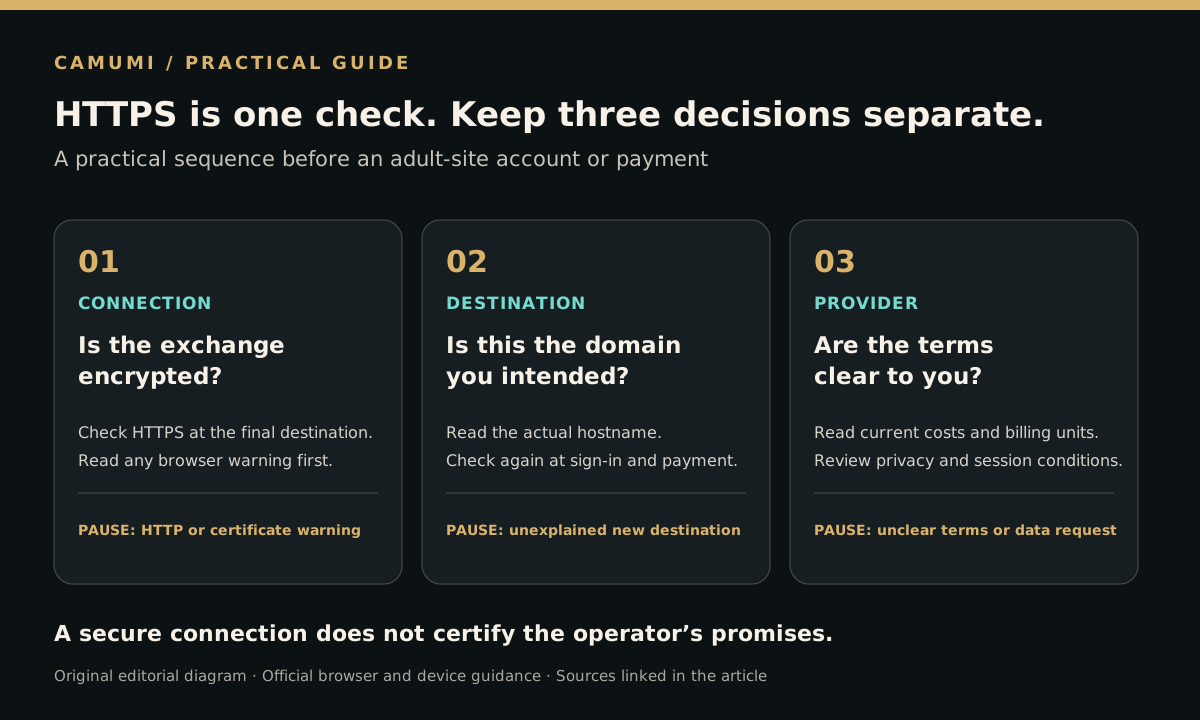
For an adult browsing a comparison site, three questions deserve separate answers. Is the connection encrypted? Is this the domain you intended to reach? Are you comfortable with the operator's terms and handling of your information? A positive answer to one does not settle the others. This article turns those questions into a short decision process you can repeat before signing in or paying.
First identify the kind of warning
A browser warning is a reason to pause, not a technical puzzle you must solve to enter a room. If you cannot tell which warning you have, close the page and return later through an address you have independently checked.
- An HTTP connection warning: the browser is asking about an unencrypted connection. Do not enter account or payment information there.
- A certificate or privacy error: the browser cannot establish the expected certificate validation. Do not treat a familiar logo as a substitute for that check.
- A dangerous-site warning: the browser has flagged a different kind of risk, such as a deceptive or harmful destination. Leave the page.
Chrome's connection-status guidance distinguishes insecure connections, dangerous sites and privacy errors. The wording and controls can vary by device. Follow the current help for your browser rather than instructions from a pop-up that asks you to turn protection off.
Check 1: the connection to the final destination
Look at the address after navigation finishes. A comparison page and an external provider are separate destinations. A secure connection to the first does not tell you what connection the next page will use. Check again when a login or checkout opens, including a new tab.
Mozilla explains that HTTPS certificates support domain authentication and encrypted transport. Browsers validate a chain of certificates before accepting that connection. A certificate problem can therefore matter even when the page appears familiar. Mozilla's certificate explanation describes what is checked.
Our practical stopping rule is simple: if a destination requests an HTTP exception or produces a certificate error, stop before entering information. Reopen the provider through an address you can verify independently. If the error remains, use the provider's official support route or choose another time. Repeatedly refreshing until you forget the warning is not a useful check.
Check 2: the domain you meant to visit
Read the address as text rather than recognizing only a logo. Compare the hostname with the provider address you independently intended to use. A reassuring word in a page title, path or long subdomain should not decide that comparison.
Chrome explicitly advises checking the site name even when the connection is secure. That is the key boundary: encryption protects the exchange with the domain you reached; it does not make every domain a trustworthy business. Chrome's explanation of a secure connection supports this distinction.
For example, imagine a bookmark opens a familiar landing page, but its payment button takes you somewhere you did not expect. Pause at that transition. A payment partner may be legitimate, but an unexpected destination requires an explanation you can verify from the provider. Do not infer legitimacy from the fact that the second page also uses HTTPS.
Check 3: what the provider will do with your information
Once the connection and address checks are satisfactory, review the decision you are actually making. Before an account or paid session, find the current price, billing unit, recurring-payment conditions if applicable, cancellation instructions and privacy information. If a term is unclear, resolve it before proceeding. These are editorial decision criteria, not claims that a particular provider meets them.
Keep the amount of information you disclose proportionate to the feature you intend to use. A request for a payment, download, identity document or new permission should trigger a fresh decision. Do not assume it follows automatically from choosing to read a page. Our live-cam privacy guide and payment-safety guide help organize those separate checks.
A useful pre-session routine
- Open the destination deliberately and let navigation finish.
- Read any warning before interacting with the page.
- Compare the final hostname with the address you intended to use.
- Check again at sign-in, payment or another external transition.
- Read the current terms for the action you are about to take.
- Stop when a connection warning or unexplained destination remains unresolved.
This routine is deliberately short enough to use every time. Save broader comparisons for the guide to choosing a cam site. A polished page, an affiliate recommendation and a familiar brand name each answer a different question from the browser's connection check.
What the October update does—and does not—establish
The verified news is a Chrome connection-warning rollout announced by Google. Our three-check routine is Camumi's editorial application of browser guidance to adult-site browsing. We have no evidence here of a rise in cam-site attacks, a newly unsafe provider or measured search demand. The value of the update is a timely reminder to treat the next destination as a new decision, particularly before sharing sensitive information.